- Sysinternals suite (filemon, regmon, procexp, tdimon, tcpview, handle)
- SnippetCompiler (to do short-lived experiments)
- baretail (to monitor logs)
- CCleaner (to tidy-up my mess)
- ipscan (to get to know my peers)
- Reflector (to see how others do it)
- Google desktop extreme (find that lost info)
- Agent Ransack (what is the Windows search useful for?)
- ScreenHunter (screen snap-shots)
- HHD Free Hex Editor
- EditpPadLite (there are Notepad2, Notepad++, Crimson, etc. as well)
- IrfanView (renders all image types)
- Recuva (undeletes that important file)
- Ad-Aware (to clean up my mess as well)
- Toad for SQL Server (actually went back to SQL Management Studio, old habit I think)
- SQL Manager 2005 for SQL Server Lite (intellisense when creating queries)
- SharpDevelop (interesting, but since I have VS I think I stick with that)
- 7-zip (actually usually use the build in Compress in XP)
- FileZilla (when I need a ftp server in an instant)
- Gimp (to edit my Display picture)
- Picassa
- Firefox (to be complete)
- SmartSniff (to pry into my neighbors business)
- TreeSize (find that disk-hog)
- Launchy (faster and more intelligent then Ctrl+r)
- WinMerge (compares files and folders!)
- Reinlendar (nice desktop calender, but surprisingly hungry for memory)
- ForceWindowVisible (a must-have for people joggling between using 2 and 1 monitor)
Wednesday, September 26, 2007
Utilities
I thought that in case my computer crashed I should have listed up all the useful utilities I have gathered so far. I have tried this before, but this list is more complete.


Tuesday, May 15, 2007
logging/tracing guidelines
I use log4net for logging/tracing, this is the current guideline:
- Debug – Used for the developer him-/herself during development
- Info – Used to leave an execution trail of the code. Useful for orientation after an error has occurred run time, in particular where the stack-trace does not capture the complete history of the operation
- Warning – Used to flag a problem that is external to the code in question, e.g. related to incorrect calling parameters. It is not perceived that the next call will generate an error.
- Error – Used to flag an internal error, when a unperceived problem occurs within the code, the operation fails
- Fatal Error – Used to flag an error that makes it impossible for the component to continue operation. This typically happens at startup when the component is not able to initialize correctly, e.g. because there is no connection to the database which contains the component’s configuration
Monday, May 14, 2007
Documentation
I was going through the design documentation of our project: It started out 2+ years ago with a requirements document (following the IEEE-830-1998 standard) from which we created an architectural design document (following the IEEE-1016-1998 standard) which we broke up into detailed design documents, one for each component of the system. I think we can truthfully claim that the first version of our product was fully compliant with the high-level documents. But in the following bug and minor releases not all high-level documents got updated, and now we are at our third minor release and the documents have become seriously out of synch. Maintaining the original documents is a headache and now the only time you will find me reading them is when I am checking on how outdated they have become, never to refresh myself on some high-level detail. Hmmmm.... So I started to rethink (as no doubt many before me) what the purpose with these high-level documents is, and the remainder of this entry is meant to ponder that question.
Requirements
With regards to the requirements documentation, I think that at the start of a project it is helpful to have a requirements document, the IEEE standard one is good to follow so that that no details get left out. It is useful to have one complete document to keep an overview of the functionality of the whole system. It is also a good medium for circulating the requirements within a reviewers group. However, when the development is under way, I think that the requirements document should be phased out (not maintained) with an issue management tool. The old requirements do not necessarily need to be transferred to the issue management tool, but all new requirements should be entered into it. Using an issue management tool makes project and release managements much easier: each issue gets a priority and a designated developer, and a log of its history (changes and comments) is maintained. And when it is time to do a new release it is easy to determine the current status of the software, what has changed since the last release and what has been left out as open issues.
Code Design
I think that it is necessary to keep the code as readable (self-documenting) as possible. It is necessary to include documentation for the following items. This might be best done within a #region of the code or perhaps in a separate document that is placed close to the code, convenience dictating the choice:
What should not be documented:
Requirements
With regards to the requirements documentation, I think that at the start of a project it is helpful to have a requirements document, the IEEE standard one is good to follow so that that no details get left out. It is useful to have one complete document to keep an overview of the functionality of the whole system. It is also a good medium for circulating the requirements within a reviewers group. However, when the development is under way, I think that the requirements document should be phased out (not maintained) with an issue management tool. The old requirements do not necessarily need to be transferred to the issue management tool, but all new requirements should be entered into it. Using an issue management tool makes project and release managements much easier: each issue gets a priority and a designated developer, and a log of its history (changes and comments) is maintained. And when it is time to do a new release it is easy to determine the current status of the software, what has changed since the last release and what has been left out as open issues.
Code Design
I think that it is necessary to keep the code as readable (self-documenting) as possible. It is necessary to include documentation for the following items. This might be best done within a #region of the code or perhaps in a separate document that is placed close to the code, convenience dictating the choice:
- Scope: What this component is to do and what not (I am assuming a component based design)
- Design: What high-level structure (pattern) was selected to solve the business problem
- Design alternatives: What other structures were considered
- Design rational: Why the design alternatives were rejected and the selected design chosen
What should not be documented:
- Class diagrams, since they can be automatically generated, if needed (using Visio e.g.)
- Database diagrams, since they can be automatically generated, if needed (using Management Studio e.g.)
Friday, March 16, 2007
Running VisualStudio in the command line
It gave me pleasure to learn how to run the VisualStudio in the command line:
c:\devenv solutionfile.sln /build debug /project subprojectThis can be helpful especially if I just want to build one project in a very big solution where it would take forever for VisualStudio to start up (especially with Resharper installed).
Thursday, March 15, 2007
Running an assembly from an intranet share
I needed this to be able to access an executable on a network share without opening up for executing all Intranet assemblies. The recommended way is to use the strong name for the assembly, this was surprisingly easy (this info can be had all over the internet):
- Create a key: sn -k mykey.snk
- Add "[assembly: AssemblyKeyFile("mykey.snk")]" to the AssemblyInfo.cs
- Compile :)
- Run ".NET Framework 2 Configuration" (to be found under Administrative Tools)
- Navigate to My Computer->Runtime Security Policy->Machine->Code Groups
- Right click on All_Code and select New and give it some name. Next
- Select "Strong Name" and click on Import
- Select the assembly/executable in question. Next
- Select FullTrust
Monday, February 26, 2007
OO vs Unit-testing
One reason for why unit testing has bothered me is that it goes against an OO principle I was thought at school, namely that every aspect of the code should be kept as private as possible.
Roy Osherove has a recent entry on this subject. Roy is an enthusiastic unit-tester, I am still in doubt :)
UPDATED 24.7.2007
Bruce Eckel's thoughts on OOP.
Roy Osherove has a recent entry on this subject. Roy is an enthusiastic unit-tester, I am still in doubt :)
UPDATED 24.7.2007
Bruce Eckel's thoughts on OOP.
Tuesday, February 20, 2007
TDD presupposition
I am pondering the validity of the following statement:
I know that this is taken as a given in unit-test camps, but is it?
UPDATED: 1.1.2008
I found out that I am not alone in not being convinced about designing for testability. The creator of TypeMock feels that designing for testability does not comply with YAGNI.
"The theory is that testable code is better designed ... If the class is easier to test, it is a better design. The test first paradigm just forces you to use good design. It makes a good design the path of least resistance." -David Hogue
I know that this is taken as a given in unit-test camps, but is it?
UPDATED: 1.1.2008
I found out that I am not alone in not being convinced about designing for testability. The creator of TypeMock feels that designing for testability does not comply with YAGNI.
Monday, February 19, 2007
Seeing the log4net output when testing under TestDriven.NET
[Update 22.02.] It is also possible to use the log4net configuration for the service or executable that will be calling the dll under test. To to this three things have to be done:
I found a nice way to be able to see the log4net output when unit testing under TestDriven.NET:
- Link the App.config file of the service or executable to the UnitTests project
- Include a
ILog sLogger = LogManager.GetLogger(typeof(IsmClientWatchdog));
in the test class, even thought sLogger is never used therein. - Add
[assembly: log4net.Config.XmlConfigurator(Watch=true)]
to the UnitTests project's AssemblyInfo.cs
XmlConfigurator.Configure()[Original post]
I found a nice way to be able to see the log4net output when unit testing under TestDriven.NET:
log4net.Appender.ConsoleAppender app;

[TestFixtureSetUp]
public void Init()
{
   app = new log4net.Appender.ConsoleAppender();
   app.Layout = new log4net.Layout.PatternLayout("%d %C{1} [%-5p] : %m%n");
   app.Threshold = log4net.Core.Level.All;
   log4net.Config.BasicConfigurator.Configure(app);
}

[TestFixtureTearDown]
public void Dispose()
{
   app.Threshold = log4net.Core.Level.Off;
}
Saturday, February 17, 2007
Unit testing, lessons learned
I was doing a small application and thought of using the opportunity to see what additional effort it would require to make it unit-testable.
- Two projects had to be added to the solution: A class library project where the code to be tested has been factored out, and a class library containing the unit-tests.
- The configuration could no longer be read directly from the app.config, because it had to be changable programatically, so a ConfigurationManager had to be introduced.
- An additional interface had to be introduced for the ConfigurationManager so that it could be stubbed out.
- A second constructor had to be added which took a ConfigurationManager as a parameter.
- The run method contained an infinite while loop and needed therefore to be split into two methods.
- Finally, all the unit-tests, of course, had to be written :)
Thursday, February 15, 2007
Visual Studio 2003 templates
The standard template for a new class in VS 2003 has been slightly irritating to me :) I finally googled this issue and found two nice articles by Michael Groeger on the subject. The first one is about changing the "Add Class..." template. The second one describes how to create a new template for Nunit test classes.
To the default class template I added copyright information and $Date$, $Author$, and $Rev$ keywords for Subversion. As well as removing the irritating: " TODO: Add constructor logic here" :)
To the default class template I added copyright information and $Date$, $Author$, and $Rev$ keywords for Subversion. As well as removing the irritating: " TODO: Add constructor logic here" :)
More on unit tests
Software development gurus, in a mistaken attempt to simplify things, make up simple rules for us simple people to follow. I think a better approach is giving us the arguments to decide by ourselves on a case-by-case bases how, or if, to use the tool or method in question.Should unit tests be used always and unconditionally?
I have been giving unit tests some thought. Unit tests are a tool and I am not religious about when to apply it. Sometimes I might mock out some external dependencies, but at other times I would like to test that dependency as well. It is often a compromise between complicating the code, and mock out external dependencies. E.g. should I introduce a configuration manager so that I can make the code independent of the database, or should I just include retrieving the configuration from the database in the test? I don't believe in using unit tests all the time, sometimes it is just too difficult to set-up the test. They should be used when the tests need to be repeatable for regression purposes. Sometimes you just know that you are not going to change that piece of code and then it is sufficient, simpler, and faster to test it manually until it works as intended :)
Another issue I have with unit tests is that they can lull one into thinking it is ok to make a change and accept it as good if no red lights appear in the test runner. The correct procedure, however, is to check if there is actually a unit test that covers the code you just changed, because, initially , it might have been deemed not feasible to create unit tests for that particular scenario.
I might be stating the obvious (it is often needed), but unit tests are a tool that should not be applied automatically or relied on blindly :)
I have been giving unit tests some thought. Unit tests are a tool and I am not religious about when to apply it. Sometimes I might mock out some external dependencies, but at other times I would like to test that dependency as well. It is often a compromise between complicating the code, and mock out external dependencies. E.g. should I introduce a configuration manager so that I can make the code independent of the database, or should I just include retrieving the configuration from the database in the test? I don't believe in using unit tests all the time, sometimes it is just too difficult to set-up the test. They should be used when the tests need to be repeatable for regression purposes. Sometimes you just know that you are not going to change that piece of code and then it is sufficient, simpler, and faster to test it manually until it works as intended :)
Another issue I have with unit tests is that they can lull one into thinking it is ok to make a change and accept it as good if no red lights appear in the test runner. The correct procedure, however, is to check if there is actually a unit test that covers the code you just changed, because, initially , it might have been deemed not feasible to create unit tests for that particular scenario.
I might be stating the obvious (it is often needed), but unit tests are a tool that should not be applied automatically or relied on blindly :)
Monday, December 18, 2006
Limitation of foreign-key constraints in SQL Server 2005
I encountered a limitation to how you can set the on-delete and on-update constraints for foreign-keys in SQL Server 2005. I have a table with 5 foreign-keys, all targeting the same column. I wished to have on-delete and on-update "Cascade" for all of them, this however was not permitted. Only one of them could have the cascade property set, the others I left with "No action"  .
.
Units tests as an afterthought
This has probably been said elsewhere and I might even have read it there ;) Still I think it is worth mentioning here.
Ideally unit tests should written as a part of a test driven design (TDD), in this case they check for code's correctness. However, sometimes the unit tests don't get done instead the code is made bug-free by testing it by hand. In this case it is still of value to write unit tests, however the focus changes: The unit tests should guard the code against external changes that affect it, i.e. ensuring its pre-conditions. These unit tests test things such as:
Ideally unit tests should written as a part of a test driven design (TDD), in this case they check for code's correctness. However, sometimes the unit tests don't get done
 instead the code is made bug-free by testing it by hand. In this case it is still of value to write unit tests, however the focus changes: The unit tests should guard the code against external changes that affect it, i.e. ensuring its pre-conditions. These unit tests test things such as:
- DB schema changes: E.g. the code should still be able to load its configuration from the database.
- Interfaces to external code: Just the simplest run through the code where all external interfaces are called should trigger test failure. This is not such an issue for strongly types languages, except where reflection is used.
Linking files between projects in VS2003
I think that linking existing files between projects should be made clearer in VS2003, not clicking on the obscure arrow next to the Open button.

I need to check if this has changed in VS2005.
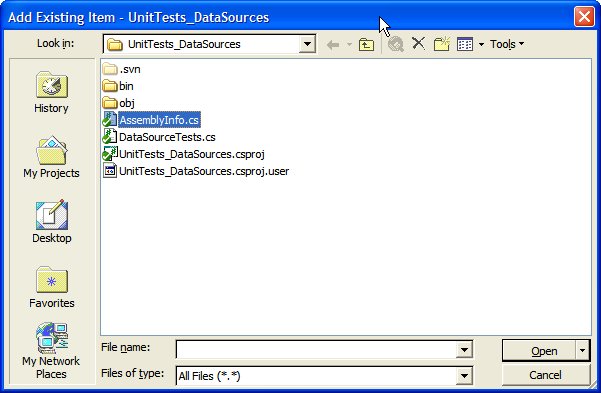
I need to check if this has changed in VS2005.
Thursday, December 14, 2006
Secrets distract
Another interesting post at Chris Sells spoutlet was about the flow of information within companies. I think he is quite right in saying that secrets should not be withheld from employees.
Data will outlive programs
I got a small epiphany when reading an old entry by Chris Sells. It made me realize that the data in the database should be left as accessible as possible for future programs. The data will most likely outlive the program created to access it.
P.s.
Actually, the reason I ended up at Chris was because he had made available a nice tool to test regular expressions.
P.s.
Actually, the reason I ended up at Chris was because he had made available a nice tool to test regular expressions.
Thursday, March 02, 2006
SqlServer: indexes
Some points to remember about indexes in SqlServer 2000:
- Primary key is a clustered unique index, but can be changed to non-clustered.
- Clustered index: Data is physically sorted by the index. Important to keep the most selective column first in the index definition. Only one clustered index possible per table. If there is only one index on a table it should be clustered. Preferably the indexed column should contain a monotonically increasing value.
- Non-clustered index: Symbolic links. Useful for single row look-ups. Can be up to 250 non-clustered indexes on a given table.
- Select indexes based on perceived use of the table: what selects will be performed, what updates will be performed, etc.
Wednesday, March 01, 2006
Missing information on Remoting
I am missing a more detailed documentation on Remoting. Not for the lack of trying: I read the Msdn documentation and we own Ingo Rammer's "Advanced .NET Remoting". Specifically I would like to know the socket options used by the TCP channel and if the size of the Remoting ThreadPool can be easily changed, per application.
Are WeakReferences used in Remoting?
Are WeakReferences used in Remoting?
Thursday, February 23, 2006
System.Console in .NET 2.0
I like to use the Console to do small test applications and it bothered me how limited it is. E.g., I have not been able to control where to place the text in the console window. In .NET 2.0 the Console class has now been much updated, e.g., there is the great new function SetCursorPosition() :)
Another missing functionality in the Console 1.0 class is a non-blocking Peak(). This is useful as a condition in a while-loop (instead of spawning a second thread that blocks on Peak() or Read()). In version 2.0 there is now the KeyAvailable property that (supposedly) serves this purpose.
This is just to mention two of the many additions to the Control class.
Another missing functionality in the Console 1.0 class is a non-blocking Peak(). This is useful as a condition in a while-loop (instead of spawning a second thread that blocks on Peak() or Read()). In version 2.0 there is now the KeyAvailable property that (supposedly) serves this purpose.
This is just to mention two of the many additions to the Control class.
Tuesday, February 21, 2006
Categorization of tests
I thought the following categorization of tests sufficient and complete:
"I believe that the traditional testing terms; unit tests, integration tests and system tests have become outdated. Instead I prefer the terms developer tests, functional tests and non-functional tests. Non-functional tests are things like performance testing, functional tests are tests that the customer cares about like use case tests or business transaction tests, and developer tests are everything else that the developer needs to test to prove to herself that the code is correct."
- Agile Development Checklist
"I believe that the traditional testing terms; unit tests, integration tests and system tests have become outdated. Instead I prefer the terms developer tests, functional tests and non-functional tests. Non-functional tests are things like performance testing, functional tests are tests that the customer cares about like use case tests or business transaction tests, and developer tests are everything else that the developer needs to test to prove to herself that the code is correct."
- Agile Development Checklist
Subscribe to:
Posts (Atom)