The standard template for a new class in VS 2003 has been slightly irritating to me :) I finally googled this issue and found two nice articles by Michael Groeger on the subject. The first one is about changing the "Add Class..." template. The second one describes how to create a new template for Nunit test classes.
To the default class template I added copyright information and $Date$, $Author$, and $Rev$ keywords for Subversion. As well as removing the irritating: " TODO: Add constructor logic here" :)
Showing posts with label VisualStudio. Show all posts
Showing posts with label VisualStudio. Show all posts
Thursday, February 15, 2007


Monday, December 18, 2006
Linking files between projects in VS2003
I think that linking existing files between projects should be made clearer in VS2003, not clicking on the obscure arrow next to the Open button.

I need to check if this has changed in VS2005.
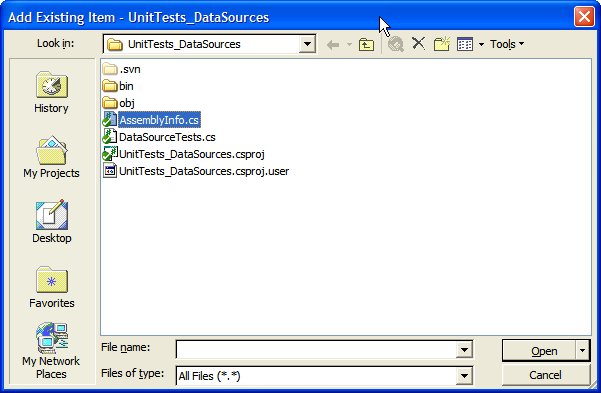
I need to check if this has changed in VS2005.
Monday, November 21, 2005
Small VS2003 tid bit
I found out an interesting fact about adding references to 3rd party dlls in VS2003 projects (have not tried this in VS2005). If, when browsing to the dll, you go through "My Documents" the dll will be placed in the the project file (*.csproj) with an absolute path. If, however, you store the dll in some 'normal' folder on the hard disk (C-drive typically), then the added reference will placed in the project file with a relative path.
The reason for this behaviour is probably that "My Documents" is treated as a mapped network drive.
This tid bit is not going to be of much interest to you unless you share your project files with other developers, then it will cause you pain if your paths to the project files are different. The lesson is not to store your code under "My Documents" :)
The reason for this behaviour is probably that "My Documents" is treated as a mapped network drive.
This tid bit is not going to be of much interest to you unless you share your project files with other developers, then it will cause you pain if your paths to the project files are different. The lesson is not to store your code under "My Documents" :)
Friday, July 29, 2005
Hidden feature of VisualStudio
I came across a blog entry regarding a hidden feature of VisualStudio (I cannot find the entry again). By adding a registry entry it is possible to let VisualStudio display vertical lines in the code viewer. This is a useful reminder to limit the number of characters per line (so that the print-out become more legible). You can try it out following the instructions below:
- find the registry entry: [HKEY_CURRENT_USER]\Software\Microsoft\VisualStudio\7.1\Text Editor
- add a string with the name "Guides" and the value "RGB(128,0,0) 90"
- restart VisualStudio
This instruction works for version 2003, but by editing a similar registry entry it should work for versions 2002 and 2005 as well. The above gives a red line at column 90.
Subscribe to:
Posts (Atom)